Features

What SQL Lizard adds to SSMS

SQL Lizard focuses on faster result analysis, richer visualization, safer SQL, easier object discovery, and smoother day-to-day productivity inside SQL Server Management Studio.

Advanced Data Grid

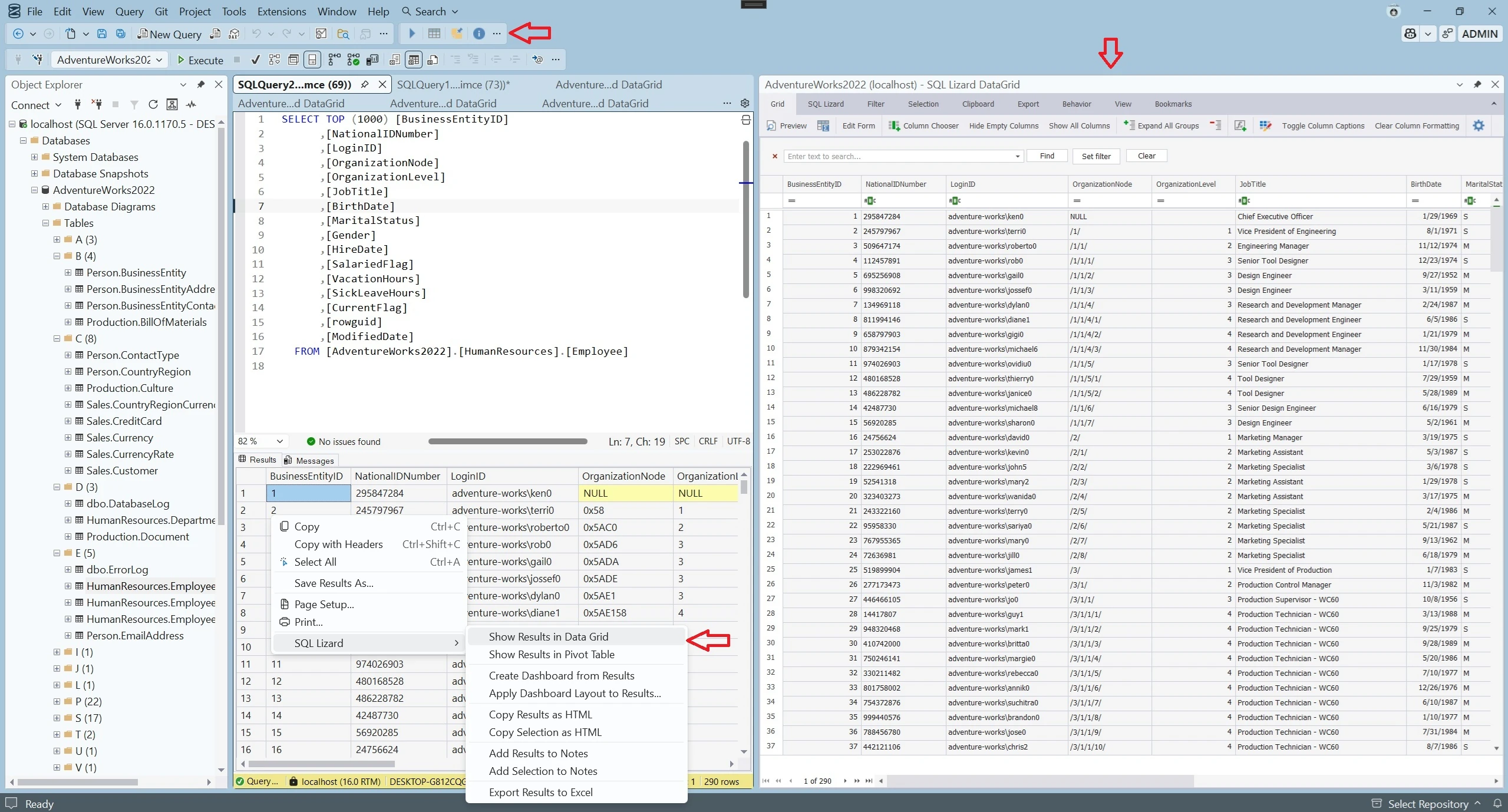
A richer result experience for serious work with data. It is useful when the default grid feels too limited for analysis, review, or presentation.

  • • grouping, filtering and sorting
  • • calculated fields and conditional formatting
  • • bookmarks, preview and notes
  • • better selection, copy and export workflows
Advanced Data Grid

Data Visualization

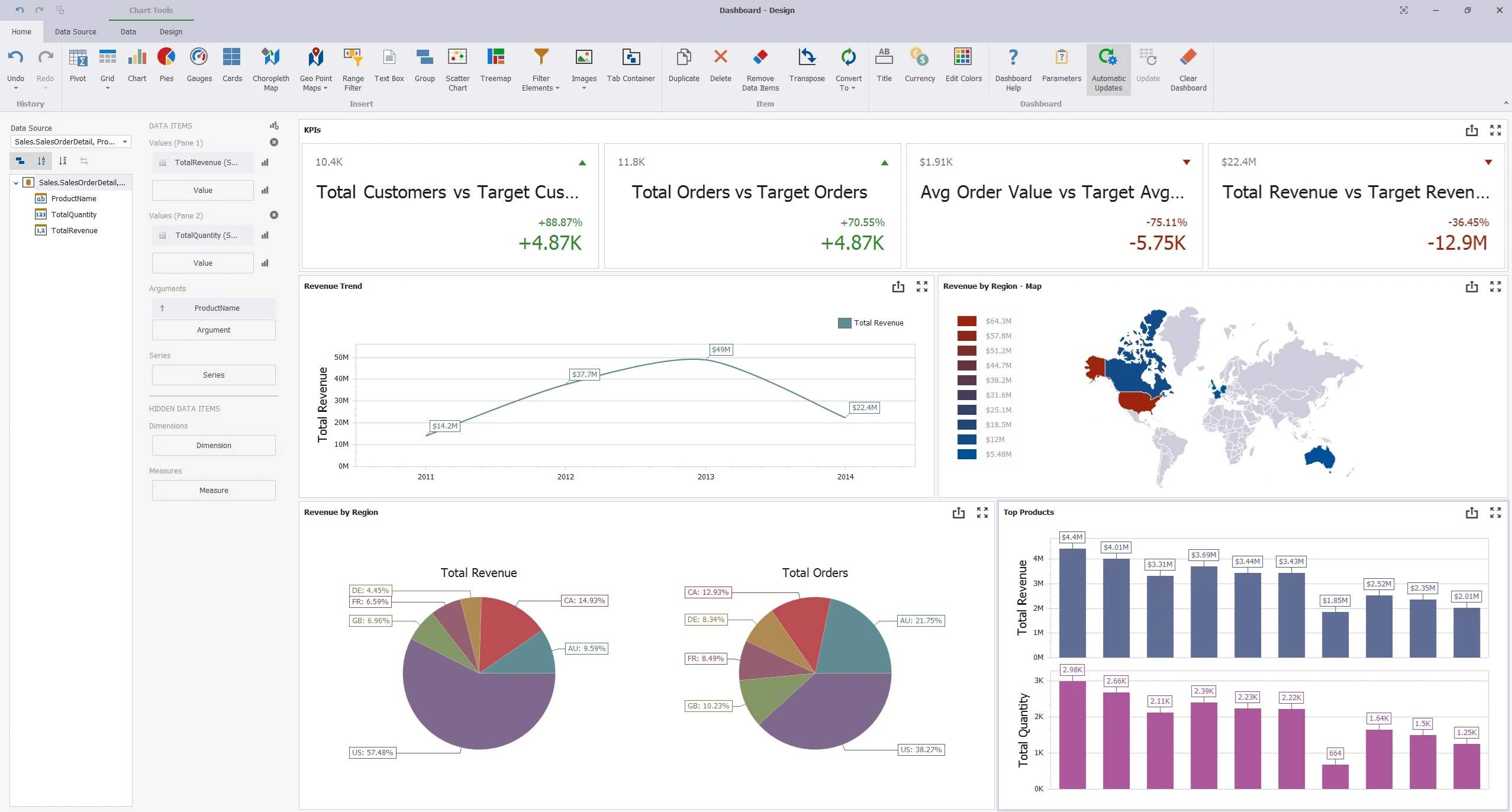
SQL Lizard brings pivot tables, charts, and dashboards closer to your SQL workflow, which is especially helpful for quick analysis and ad-hoc reporting.

  • • show results in pivot table
  • • create dashboards from results
  • • apply saved dashboard layouts to current results
Data Visualization

Data and Object Explorer Features

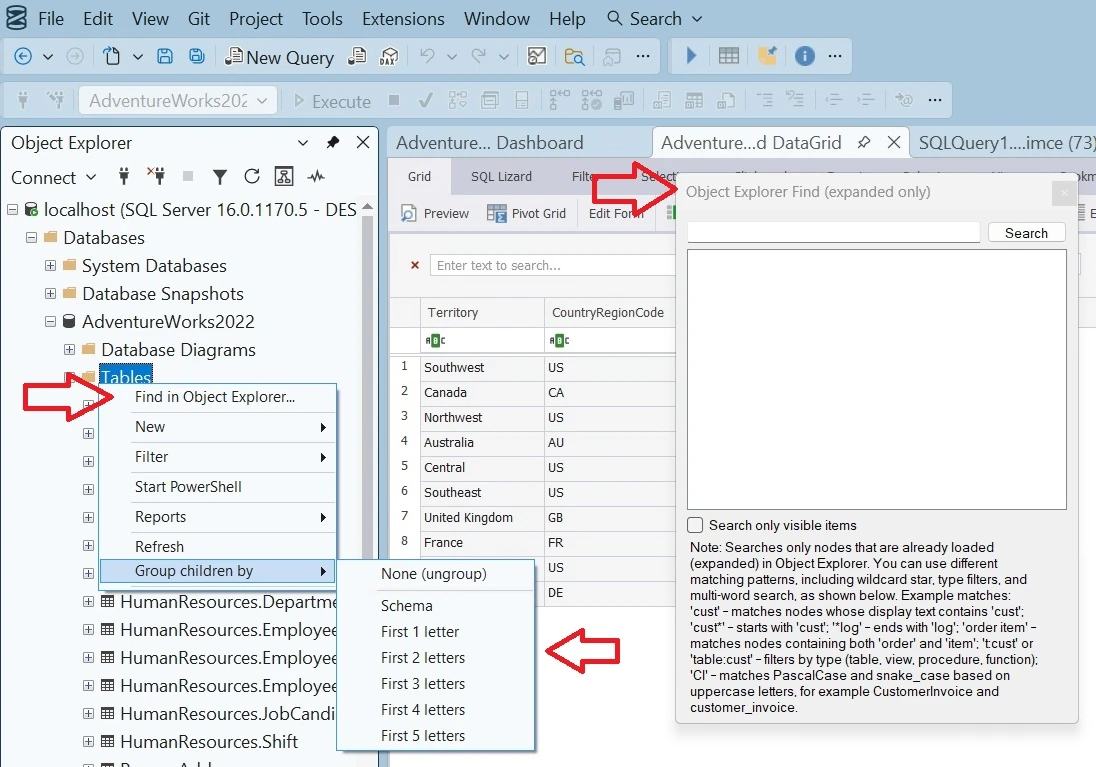
Object discovery and navigation matter in large databases. SQL Lizard adds practical ways to organize and find objects more quickly.

  • • group objects by schema
  • • group objects by name
  • • quick find by full or partial object name
Data and Object Explorer Features

Advanced Data Grid

The Advanced Data Grid is the main feature

The Advanced Data Grid is where most of the daily work happens. It turns query results into something you can actually work with, not just view.

You can explore, filter, compare, annotate, and prepare data directly inside SSMS without exporting or switching tools. This is especially useful when working with larger datasets or when results need deeper inspection before sharing.

What makes it useful

  • • grouping, sorting, and filtering for faster analysis
  • • bookmarks and row marking for tracking important records
  • • conditional formatting and calculated fields for clearer review
  • • preview and notes for working with results more comfortably
  • • better selection, copy, and clipboard-friendly formats
  • • one-click export to Excel for quick sharing and further work
  • • password-protected Excel export for safer data distribution
  • • export multiple result sets into a single Excel file

Why it matters

A large part of SQL work is understanding the output, not just writing the query. The default SSMS grid is often too limited for that.

With SQL Lizard, you can also take any existing SSMS result grid and open it in the Advanced Data Grid directly from the right-click context menu. This means you can start with the default experience and move to a more powerful one only when you need it, without rerunning queries or changing your workflow.

The result is a smoother workflow with less friction. You stay inside SSMS, reduce unnecessary exports, and only switch tools when there is a real need.

Dashboard feature

Dashboards are the main visualization feature

If the data grid helps you inspect data, dashboards help you shape and present it. This is the feature that turns query results into a more visual working surface directly inside SSMS.

You can build dashboards from result sets, configure layout, combine multiple visual items, and save layouts to reuse later. This is useful for recurring analysis, troubleshooting, presentations, and quick internal reporting.

What you can place on a dashboard

  • • charts, including bar and line styles
  • • pies and treemaps
  • • pivot tables and grids
  • • cards and gauges
  • • maps
  • • tree-based filter elements
  • • date and range filters for time-based analysis
  • • groups and tab containers for layout

Why it matters

Dashboards reduce repeated export and rework. Instead of sending result sets to Excel or another tool every time, you can build and reuse visual layouts directly inside SSMS.

You can take results from the default SSMS grid and open them directly in the dashboard designer, without rerunning queries. You can also open saved dashboard layouts and apply them to new result sets, which makes recurring analysis much faster.

The result is a more consistent and efficient workflow. You keep the visual layer close to your SQL, reduce tool switching, and reuse dashboard structures instead of rebuilding them every time.

All features

All features available in SQL Lizard

Advanced Data Grid

Work with result sets using grouping, filtering, sorting, calculated fields, conditional formatting, bookmarks, preview, notes, selection tools, and richer export and copy options.

Data Visualization

Open results in pivot tables, charts, and dashboards directly from query output for faster ad-hoc analysis and reporting inside SSMS.

Object Explorer Features

Navigate large databases more comfortably by grouping objects by schema or name and quickly finding objects by full or partial name.

SQL Format

Clean up SQL and make scripts easier to read and review.

SQL Lint

Check scripts for common problems, including risky statements such as missing WHERE clauses.

One-click export to Excel

Export results quickly to Excel when you need to share or continue work outside SSMS.

Password-protected Excel

Useful when exported files need an extra level of protection before sharing.

Notes

Capture findings and keep text, selections, or result snippets close to the work.

Query history

Keep track of query executions in the Output window or in a file, depending on your setup.

Clipboard helpers

Copy results with formatting, with headers, or as HTML for easier reuse.

VB.NET scripts

Optional scripting support for advanced users who need a more programmable workflow.

SQLite and log parsing

Useful for niche scenarios involving SQLite queries and reading log or text files.